Watermark-Based Incremental Loads: A Simple Guide
A watermark-based incremental load copies only the rows that changed since the last run, instead of reloading the whole table every time. It is one of the simplest and most widely used patterns in data engineering, and it works in almost every tool: SQL, Azure Data Factory, Microsoft Fabric pipelines, Databricks, dbt and plain Python.
Why full loads stop scaling
Imagine a sales table that grows by 50,000 rows a day. On day one, copying all of it to your warehouse takes a minute. After two years it holds 36 million rows, and a nightly full reload now takes an hour, burns compute, and hammers the source database while users are trying to work.
Yet only 50,000 of those 36 million rows are actually new. A full load moves 99.9% of the data for nothing. The incremental pattern fixes that by asking one question each run: what has changed since I last looked? The watermark is how the pipeline remembers the answer.
How it works
A watermark is a bookmark: the highest value of a “change” column (usually a timestamp like LastModifiedDate, or an ever-increasing ID) that the pipeline has already loaded. It is stored in a small control table, separate from the data.
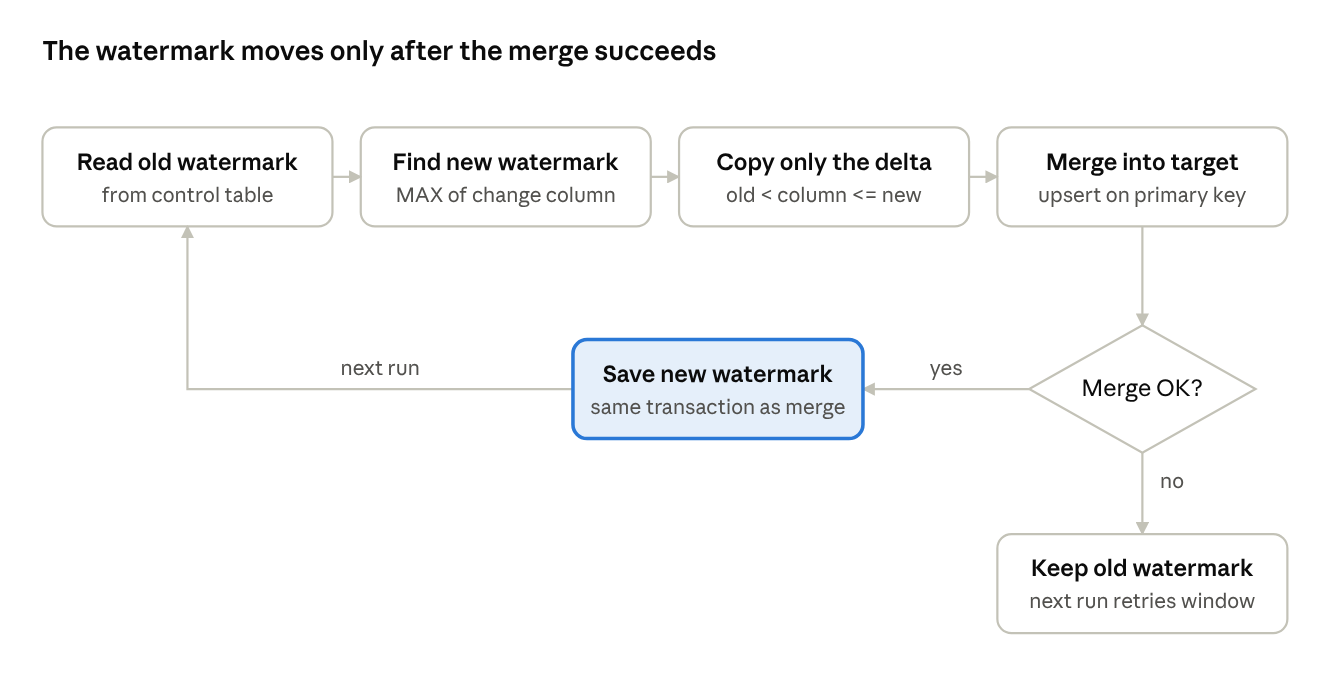
Every run follows the same five steps:
- Read the old watermark from the control table, for example 2026-10-01 23:00:00.
- Find the new watermark by reading MAX(LastModifiedDate) from the source, for example 2026-10-02 23:00:00.
- Copy only the delta: rows where the change column is greater than the old watermark and less than or equal to the new one.
- Merge the delta into the target (insert new rows, update changed ones).
- Save the new watermark to the control table, but only after step 4 succeeds.
 View full size (opens in a new tab)
If the merge fails, the watermark stays where it was, so the next run simply retries the same window and no data is lost.
In SQL, the heart of it looks like this:
-- Control table: one row per source table
CREATE TABLE etl_watermark (
    table_name      VARCHAR(100) PRIMARY KEY,
    watermark_value DATETIME2    NOT NULL
);

-- Steps 1 and 2
DECLARE @old DATETIME2 = (SELECT watermark_value FROM etl_watermark WHERE table_name = 'sales');
DECLARE @new DATETIME2 = (SELECT MAX(LastModifiedDate) FROM src.sales);

-- Step 3: extract only the changed rows
SELECT *
FROM src.sales
WHERE LastModifiedDate >  @old
  AND LastModifiedDate <= @new;

-- Step 5: after the merge succeeds
UPDATE etl_watermark SET watermark_value = @new WHERE table_name = 'sales';
Capturing @new before extracting matters. Rows written while the copy is running get a later timestamp, so they are simply picked up next run instead of being skipped.
Choosing a good watermark column
The whole pattern is only as reliable as the column you pick. A good watermark column always moves forward, is updated on every insert and every change, and never goes back in time.
| Column type | Example | Catches inserts | Catches updates | Watch out for |
|---|---|---|---|---|
| Last-modified timestamp | LastModifiedDate | Yes | Yes | App or job that forgets to set it; clock and time-zone differences |
| Identity / auto-increment ID | OrderID | Yes | No | Only good for append-only tables like logs and events |
| Row version | SQL Server rowversion | Yes | Yes | Database-specific; not human-readable |
| Created date | CreatedDate | Yes | No | Silently misses every edit to an old row |
| Business date | InvoiceDate | Sometimes | No | Back-dated entries fall behind the watermark and are lost |
Rule of thumb: use a last-modified timestamp or a row version for tables that get updated, and an identity ID for append-only tables. If the source has neither, ask the source team to add one; it is cheaper than every workaround.
Pros
- Much faster runs. Moving 50,000 rows instead of 36 million turns an hour-long job into minutes, and the run time stays flat as the table grows.
- Lower cost. Less data read, moved and written means fewer compute minutes, less network egress and smaller cloud bills.
- Gentler on the source. A short, indexed query replaces a full table scan, so the operational database is not slowed down for its users.
- Fresher data. Because each run is cheap, you can run it hourly or every 15 minutes instead of once a night.
- Simple to build and explain. One control table and one filter. No special database features, licences or agents are needed, unlike Change Data Capture (CDC).
- Works everywhere. Any source you can query with a WHERE clause can be loaded this way, including APIs that accept a “modified since” parameter.
- Easy to rerun. Resetting the watermark to an earlier value reloads a chosen window, which makes recovery and backfills straightforward.
Cons and common pitfalls
- Deletes are invisible. A deleted row has no timestamp left to compare, so the target keeps it forever. Fixes: ask for soft deletes (an IsDeleted flag), or run a periodic key comparison between source and target.
- It trusts the source column completely. If a bulk script, a manual fix or a trigger updates rows without touching LastModifiedDate, those changes are never loaded, and nothing errors.
- Late-arriving data can be skipped. A long transaction that started before the run but commits after it may carry a timestamp older than the new watermark. Fix: subtract a small safety overlap (say 5 to 15 minutes) from the old watermark and rely on the merge to absorb duplicates.
- Clock and time-zone traps. Servers in different time zones, daylight-saving shifts, or a mix of local time and UTC can move the watermark backwards or forwards. Store and compare everything in UTC.
- Intermediate changes are lost. If a row changes three times between runs, you only see its final state. That is fine for reporting, but not for auditing every change; use CDC or temporal tables for that.
- Duplicates on equal timestamps. Many rows can share one timestamp. Using > with the old value and <= with the new one, plus a merge on the primary key, keeps the load correct.
- Schema changes still break it. A new or renamed column in the source needs handling just as in any pipeline.
- Updating the watermark too early. Saving the new value before the merge finishes means a failed run silently drops that window. Always save it last, ideally in the same transaction as the merge.
Storage
Incremental loads save storage on the way in, but they make you decide how history is kept on the way out. Three things need storage thought.
1. The watermark itself. Keep it in a small, durable control table, not in a pipeline variable or a local file that disappears on redeploy. Useful columns:
| Column | Purpose |
|---|---|
| table_name | Which source table this row tracks |
| watermark_column | Which column is used as the watermark |
| watermark_value | Last value successfully loaded (in UTC) |
| last_run_status | Succeeded or failed |
| rows_loaded | Size of the last delta, handy for spotting anomalies |
| updated_at | When the watermark last moved |
One control table can drive hundreds of source tables, which makes the pipeline metadata-driven: add a row, and a new table gets loaded.
2. The landing (raw) layer. Each run writes a small delta file or batch. Store these partitioned by load date, for example /raw/sales/load_date=2026-10-02/. That keeps an exact record of what arrived when and lets you replay a single day. Over time, thousands of tiny files slow reads down, so schedule compaction (for example OPTIMIZE on Delta Lake) and a retention policy for old raw files.
3. The target table. Decide how changes land:
- Upsert (merge): the target holds only the current version of each row. Smallest footprint, no history.
- Append with history (SCD Type 2): every change becomes a new row with valid-from and valid-to dates. Full history, but the table grows with every update.
- Table formats like Delta Lake or Iceberg add time travel on top of an upsert, at the cost of keeping old file versions until they are vacuumed.
Performance
The pattern is only fast if the filter WHERE LastModifiedDate > @old is fast. Most of the tuning happens at the source.
- Index the watermark column. Without an index, the database scans the whole table to find the new rows, and you lose most of the benefit. A non-clustered index on LastModifiedDate (or a partition on it) turns the scan into a quick range lookup. Agree this with the source DBA, since indexes add a small cost to every write.
- Make MAX() cheap. The same index lets the database read the new watermark in milliseconds instead of scanning.
- Merge on an indexed key. On the target, the merge joins the delta to the existing table on the primary key. Index or cluster the target on that key, or partition it so the merge only touches recent partitions.
- Pick a sensible frequency. Too rare and each delta becomes large; too frequent and per-run overhead (startup, metadata calls) dominates. For most business tables, hourly to daily is the sweet spot.
- Run tables in parallel. With a metadata-driven control table, a ForEach loop (in Data Factory or Fabric) can load many tables at once. Cap the concurrency so you do not overload the source.
- Chunk the first load and big backfills. The very first run is effectively a full load. Load it in date ranges (one month at a time, say) and move the watermark after each chunk, so a failure does not restart from zero.
- Avoid functions on the column. A filter like WHERE CAST(LastModifiedDate AS DATE) > @old stops the index being used. Compare the raw column to a parameter of the same data type.
- Monitor the delta size. A sudden jump (a mass update) or a run of zeros (a broken timestamp) is the earliest warning that something upstream changed.
Security
An incremental pipeline runs unattended, often every hour, with standing access to production data. That makes its identity and its control table worth protecting.
- Least-privilege source access. The pipeline account needs SELECT on the source tables it loads, and nothing more. It should never be able to write to the source.
- Protect the control table. Anyone who can edit watermark_value can make the pipeline skip data (move it forward) or reload and duplicate data (move it back). Restrict write access to the pipeline identity and log every change.
- No passwords in code. Use managed identities or service principals, and keep any secrets in a vault such as Azure Key Vault, referenced by the pipeline at run time.
- Encrypt in transit and at rest. Use TLS for the source connection and encrypted storage for raw delta files. Small daily files are easy to copy, so they need the same protection as the main table.
- Avoid SQL injection in dynamic queries. Metadata-driven pipelines build queries from table names and watermark values. Pass values as parameters, and validate table names against an allowed list rather than concatenating strings.
- Handle sensitive columns early. Mask, hash or drop personal data (PII) during the incremental load so it never lands in raw storage unprotected.
- Deletes and privacy laws. Because watermarks miss deletes, a customer deleted at the source for a data-privacy request (for example under India’s DPDP Act or GDPR) may live on in your warehouse. A delete-detection process is a compliance need, not just a data-quality one.
- Audit trail. Log each run’s old and new watermark, row counts, start and end time and the identity used. It answers “what was loaded, when, and by whom” during an audit or incident.
Checklist and when not to use it
Before going live, tick these off:
- ☐ The watermark column changes on every insert and update, and it is indexed
- ☐ All timestamps are stored and compared in UTC
- ☐ The new watermark is captured before extraction, and saved only after a successful merge
- ☐ A small safety overlap is applied, and the merge on primary key absorbs duplicates
- ☐ Deletes are handled (soft-delete flag or periodic key comparison)
- ☐ The control table is write-protected and every run is logged
- ☐ Secrets live in a vault; the pipeline identity has read-only source access
- ☐ Delta row counts are monitored with an alert for spikes and zeros
Choose something else when:
| Situation | Better option |
|---|---|
| The table is small (a few thousand rows) | A full load: simpler and still fast |
| You must capture deletes or every intermediate change | Change Data Capture (CDC) or Change Tracking |
| The source has no reliable change column and cannot add one | Full load with hash comparison, or CDC |
| You need near real-time (seconds) | Streaming or CDC into an event platform |
Conclusion
Watermark-based incremental loading trades a little upfront care for big, lasting savings: runs that stay fast as data grows, lower cost, a lighter touch on source systems and fresher reports. Its weak spots are predictable (deletes, unreliable timestamps, late data and an unprotected control table), and each has a simple, well-known fix.
Get the watermark column right, save the watermark last, and treat the control table as sensitive. Do those three things and this pattern will carry most of your batch pipelines reliably for years.