Financial Data Transformation
Making engineering decisions from execution-plan evidence rather than intuition.
Designed and optimised a financial data processing pipeline in Microsoft Fabric using PySpark and Delta Lake. The project focused on improving pipeline performance, enforcing data quality, enabling data recovery, and building a scalable architecture for enterprise-scale financial reporting.
The business problem
A multinational finance division relied on a daily Accounts Receivable (AR) reporting pipeline that processed 45 million transaction records by joining them with a 15,000-record customer master table.
The existing pipeline faced several challenges:
- Processing time exceeded 2 hours
- Large data shuffling caused poor Spark performance
- Invalid data was loaded because schema validation was missing
- Corrupted data reached executive dashboards
- No mechanism existed to recover previous versions after bad data loads
- Growing data volumes reduced query performance
- Manual recovery increased operational risk and compliance concerns
Key objectives
Reduce pipeline execution time · optimise PySpark joins for large datasets · improve data quality through schema validation · enable version control and data recovery · build a scalable, maintainable pipeline · improve query performance for analytical reporting · support governance, auditing, and compliance requirements.
Solution architecture
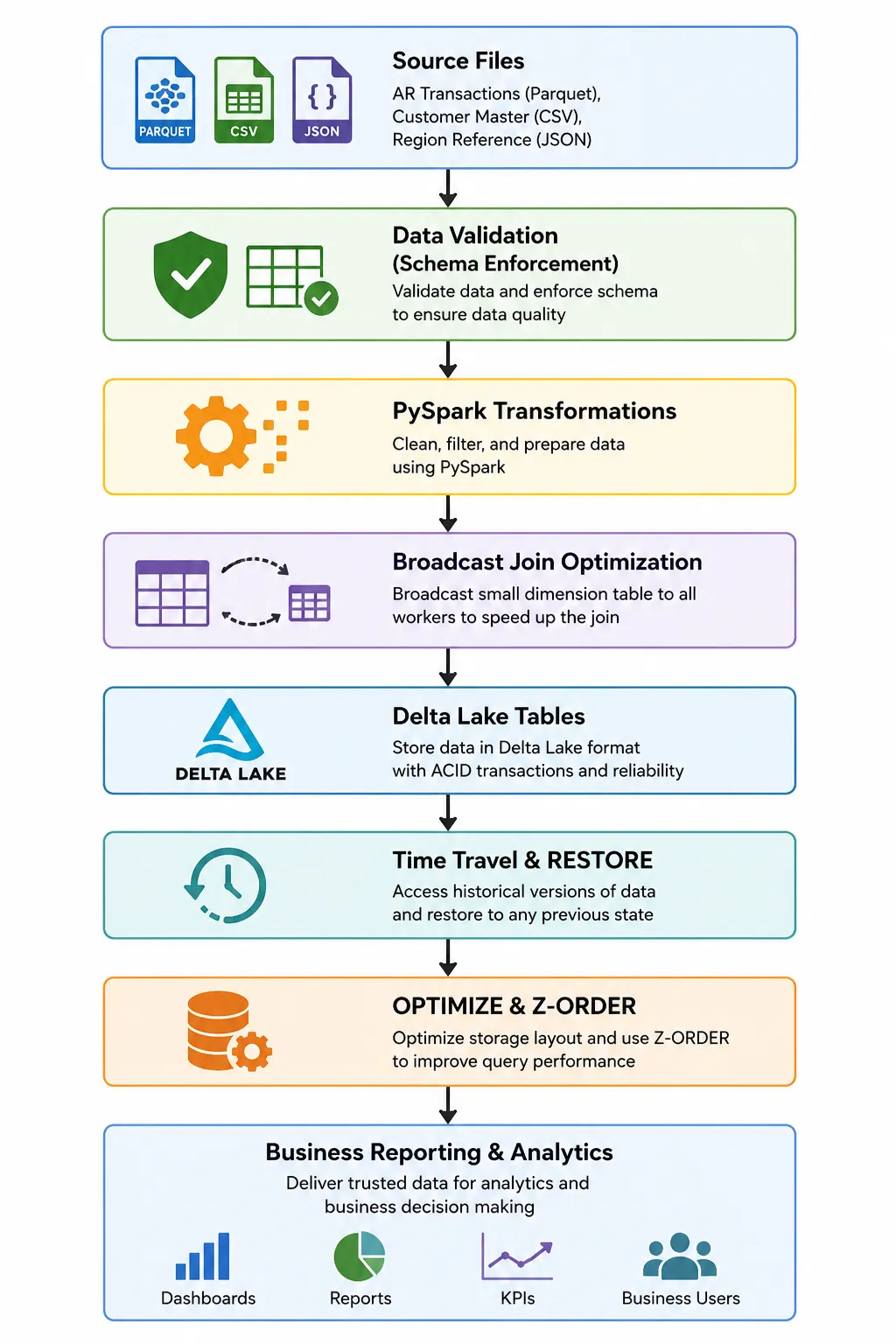
- Source files — raw financial data from transaction records, customer master data, and reference datasets.
- Data validation (schema enforcement) — incoming data is validated against predefined schemas so only accurate, properly formatted records enter the pipeline.
- PySpark transformations — data is cleaned, transformed, and prepared into a structured dataset.
- Broadcast join optimisation — the customer master table is broadcast to all worker nodes, reducing shuffling and improving join performance.
- Delta Lake tables — processed data is stored with ACID transactions, schema enforcement, and reliable version control.
- Time Travel and RESTORE — version history is used to view previous table states and quickly restore after an incorrect or failed load.
- OPTIMIZE and Z-ORDER — files are compacted and reorganised to improve storage efficiency and speed up queries on large datasets.
- Business reporting and analytics — trusted data is delivered for reporting, dashboards, and decision-making.
Step 1 — Define the schema and load
Rather than letting Spark infer types, the structure of each dataset is stated explicitly:
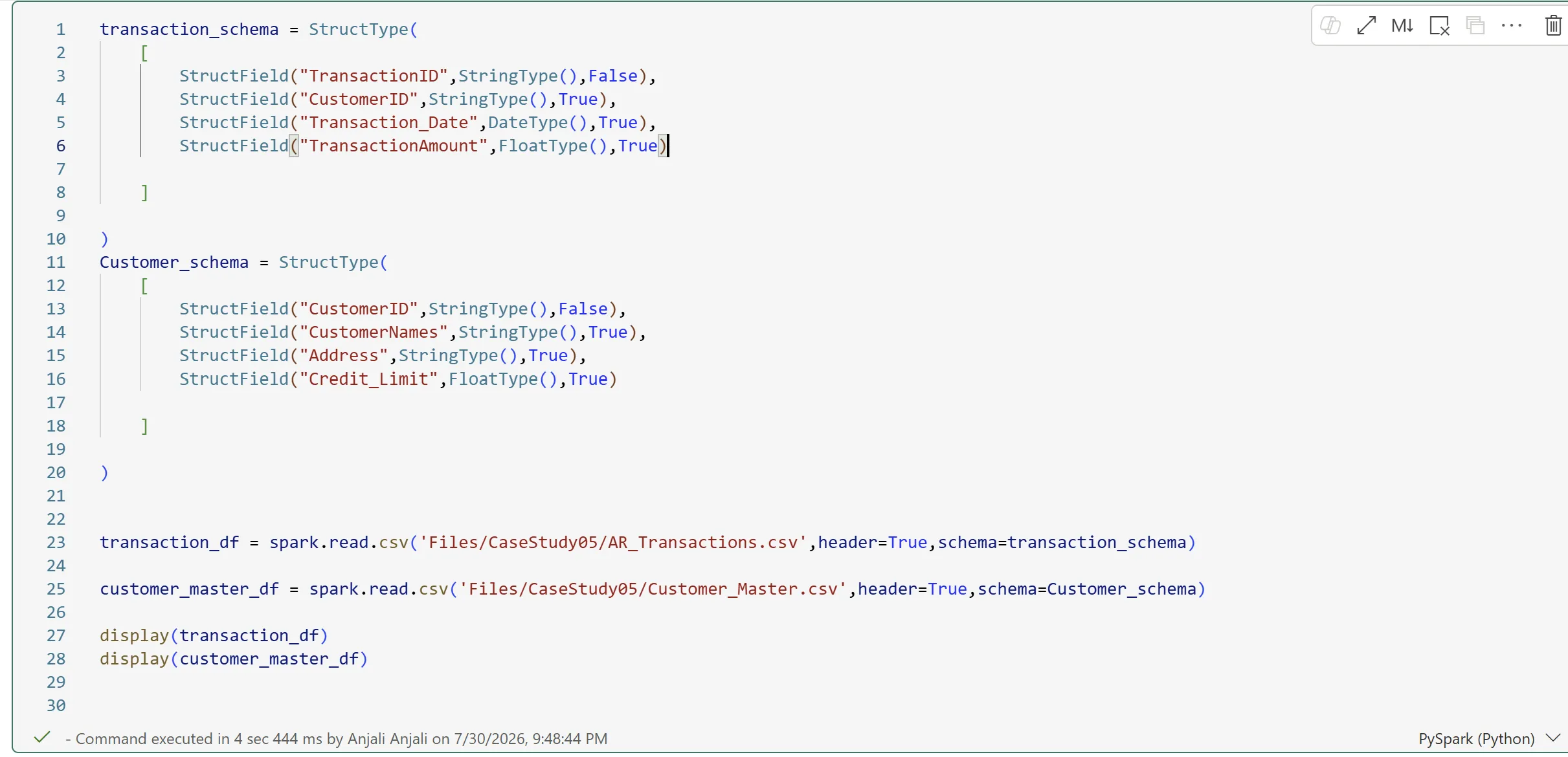
transaction_schema = StructType([
    StructField("TransactionID", StringType(), False),
    StructField("CustomerID", StringType(), True),
    StructField("Transaction_Date", DateType(), True),
    StructField("TransactionAmount", FloatType(), True),
])

Customer_schema = StructType([
    StructField("CustomerID", StringType(), False),
    StructField("CustomerNames", StringType(), True),
    StructField("Address", StringType(), True),
    StructField("Credit_Limit", FloatType(), True),
])

transaction_df = spark.read.csv('Files/CaseStudy05/AR_Transactions.csv', header=True, schema=transaction_schema)
customer_master_df = spark.read.csv('Files/CaseStudy05/Customer_Master.csv', header=True, schema=Customer_schema)
Defining the schema improves data quality by preventing incorrect data types, avoids errors caused by automatic schema inference, and speeds up loading — Spark no longer needs to scan the dataset to determine column types. On 45 million rows, that scan is not free.
Step 2 — Broadcast join optimisation
The customer master table is much smaller than the AR transactions table. Broadcasting the smaller side to all worker nodes eliminates expensive shuffling:
spark.conf.set("spark.sql.autoBroadcastJoinThreshold", 10 * 1024 * 1024)  # 10 MB

joined_df = transaction_df.join(customer_master_df, "CustomerID", "left")
joined_df.explain(mode="formatted")
The point is not that broadcasting is faster — it is that explain() proves Spark actually
chose it. The physical plan confirms:
- AdaptiveSparkPlan — Spark dynamically optimises query execution at runtime.
- BroadcastHashJoin — confirms the optimised broadcast strategy was selected.
- BroadcastExchange — the customer master table was broadcast to all executors before the join.
- Scan CSV — the source files read before transformations and joins.
Broadcast join copies the smaller table to every worker and joins locally, eliminating shuffle — best for one small and one large table. Sort merge join shuffles and sorts both sides on the join key before merging — necessary when both tables are large, and slower for it.
Step 3 — Validate schema enforcement in Delta Lake
A Delta table is created from the valid customer master dataset, then a deliberately
invalid dataset — where Credit_Limit carries the wrong data type — is appended to it.
Delta Lake validates the schema of incoming data before writing. Because the types do not match, it rejects the write, preventing invalid or inconsistent data from being stored. Testing this deliberately is the only way to know the guardrail is actually armed.
Step 4 — Time Travel and RESTORE
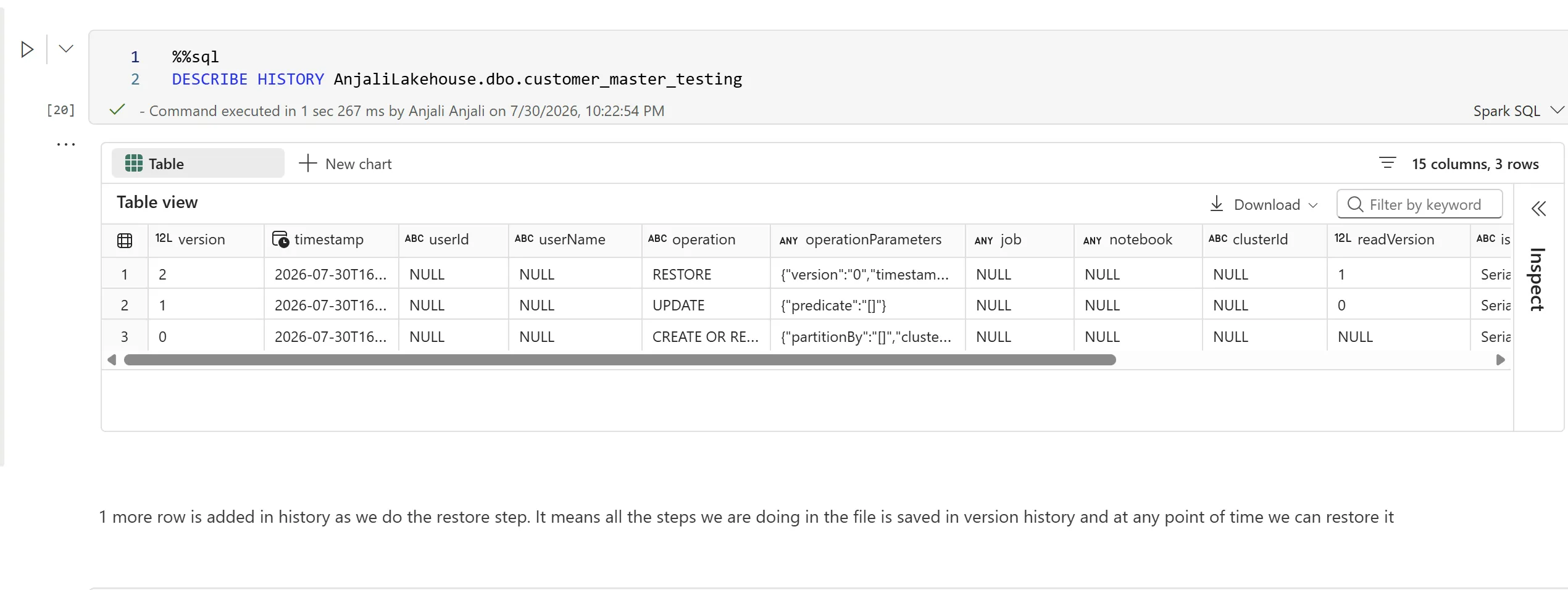
Every record in the customer_master_testing Delta table is updated to set Credit_Limit
to 1 — simulating exactly the kind of bad load that previously reached executive
dashboards. The table’s version history is then used to inspect and reverse it:
UPDATE customer_master_testing SET Credit_Limit = 1;

DESCRIBE HISTORY customer_master_testing;

SELECT * FROM customer_master_testing VERSION AS OF 0;

RESTORE TABLE customer_master_testing VERSION AS OF 0;
This is what replaces manual recovery: previous versions are accessible without backups, accidental updates and deletions are reversible, and every operation on the table is auditable.
Delta Lake commands used for versioning and recovery5 functions
- UPDATE
- Modifies existing records in the Delta table.
- SELECT
- Displays the current contents of the table after the update.
- DESCRIBE HISTORY
- Shows the version history and all operations performed on the Delta table.
- VERSION AS OF
- Reads data from a specific historical version of the table.
- RESTORE TABLE … VERSION AS OF
- Restores the Delta table to a selected previous version.
PySpark and Spark configuration functions used7 functions
- StructType() / StructField()
- Create the overall schema and define each column’s name, data type, and nullability.
- schema=
- Applies the predefined schema while reading a file, ensuring correct types per column.
- inferSchema=True
- The alternative: Spark examines the data to determine each column’s type, at the cost of an extra pass over the dataset.
- spark.conf.set()
- Sets Spark configuration properties at runtime.
- spark.sql.autoBroadcastJoinThreshold
- Specifies the maximum table size Spark will automatically broadcast during a join.
- join()
- Combines two DataFrames on a common key — here
CustomerID, with a left join. - explain(mode="formatted")
- Displays Spark’s physical execution plan, verifying the join strategy and identifying optimisations.