Logistics Data Modernization
A watermark-based ingestion pipeline, and the operational discipline of letting the pipeline remember what the analyst no longer needs to.
Designed and implemented an incremental data ingestion pipeline using Microsoft Fabric to modernise logistics data processing for a global freight company. The solution automated ingestion of high-volume JSON shipment logs using a watermark-based state management approach — eliminating manual file selection, reducing reporting latency, and ensuring reliable, auditable data ingestion into a Delta Lake architecture.
Objectives
- Automate incremental data ingestion.
- Process only new shipment files.
- Eliminate duplicate and missed records.
- Improve data reliability and auditability.
- Reduce reporting latency through automated pipelines.
The pipeline, step by step
The whole design rests on one idea: the pipeline keeps a durable record of how far it has read, so no human has to remember which files were already processed.
Create the watermark log table (SQL). A SQL table that tracks the last processed timestamp and manages the pipeline’s incremental state.
Seed the baseline watermark. An
INSERTpopulates the initial timestamp value, establishing the starting baseline for the incremental load.Automate watermark updates. An
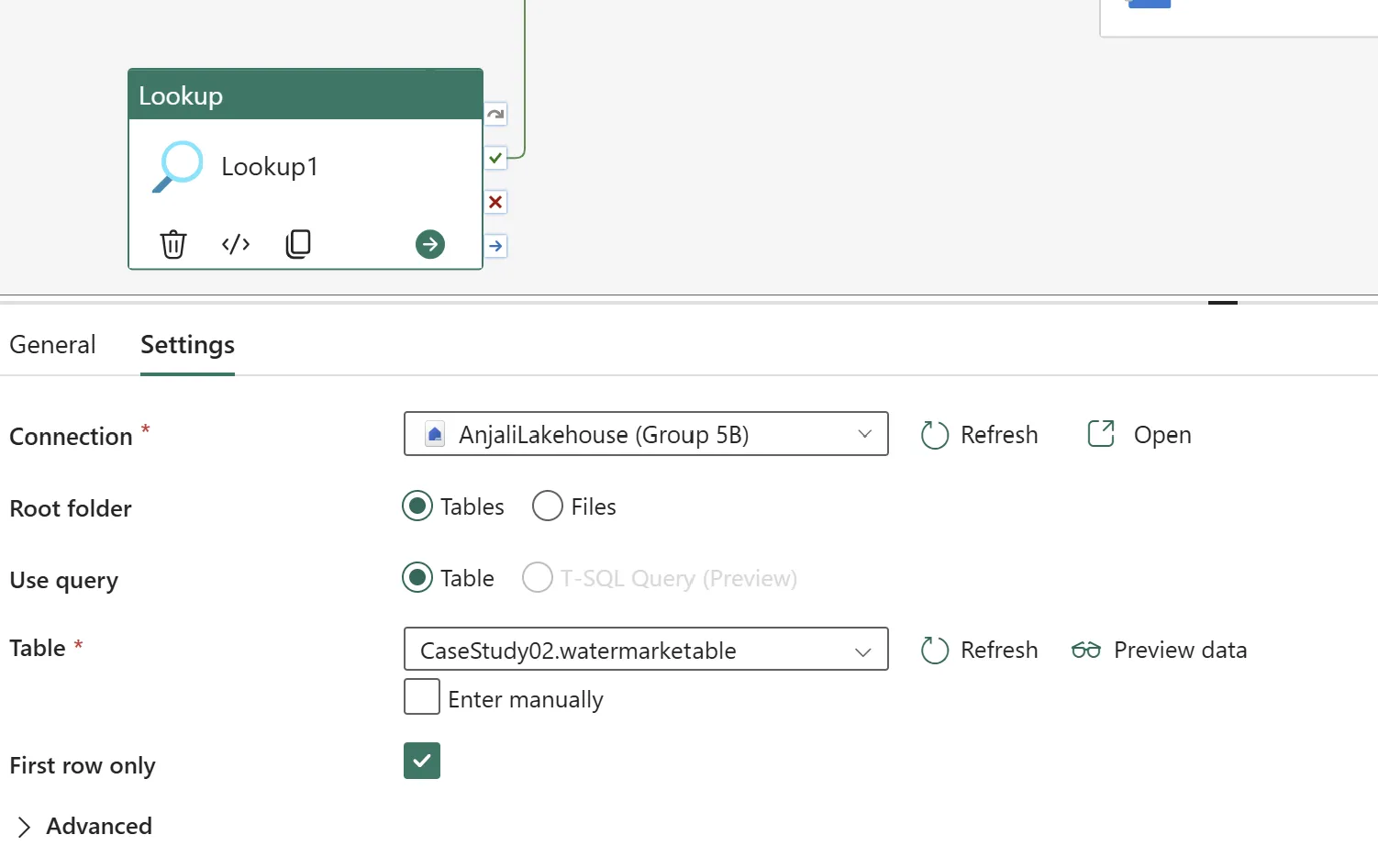
UPDATEquery executes at the end of each successful run, advancing the timestamp to log the new state.Configure the Lookup activity. A Lookup against the watermark log table retrieves the last successfully processed timestamp, establishing the starting point for the current run.
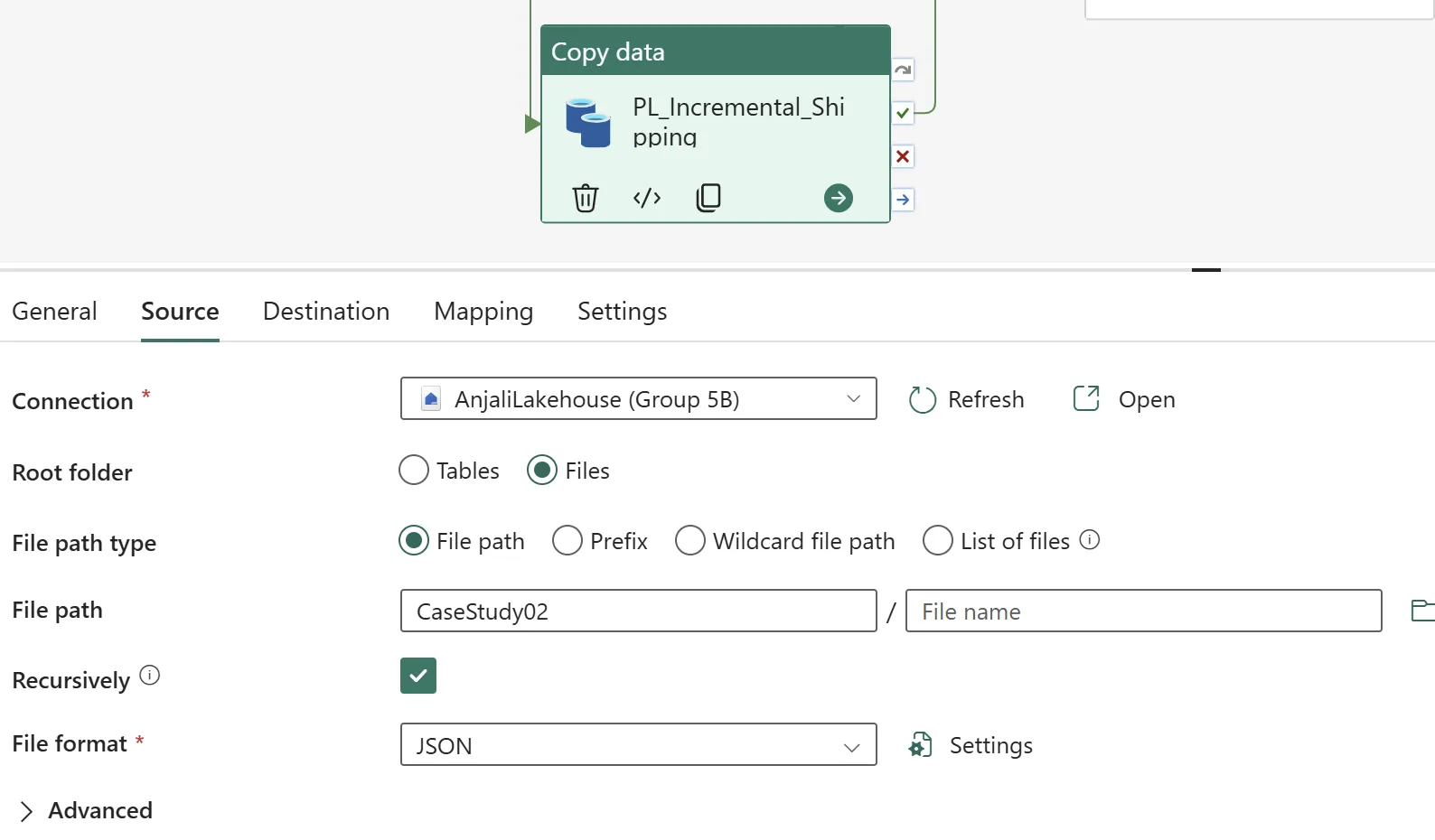
Configure the incremental data flow. The core extraction logic filters source data using the retrieved watermark timestamp, so the pipeline pulls only newly arrived files and cleanly appends them to the main Delta Lake table without duplication.
Update the watermark (Notebook activity). A notebook parameterised with the pipeline trigger time writes the new timestamp back to the watermark log after successful ingestion, resetting the baseline for the next run.
The scenarios that test the design
The Post-Trigger File
It is 6:03 AM. The pipeline has run. At 8:47 AM, a carrier uploads a new file containing the status update David needs for his 9:00 AM report. What happens?
No, it will not be picked up by today’s pipeline. Assuming the pipeline operates on a daily morning schedule, it already completed its run at 6:03 AM. Because the pipeline is triggered by a schedule rather than an event — such as a file landing — it is currently inactive. The file will sit safely in the landing zone and will be ingested during tomorrow’s scheduled run.
This is a real limitation, not a defect: the fix is an event-based trigger, and the trade-off is cost and run frequency against reporting freshness. Naming it explicitly is what lets the business choose.
The Silent Column
The carrier integration team adds an InsuranceValue field to all JSON files over the weekend. Monday's pipeline succeeds without error. The field is nowhere in the table.
The pipeline succeeded because it was never told to expect the field — the write matched
the existing schema and quietly dropped the rest. The recovery is to update the schema:
execute a SQL command against the destination Delta table to add the missing
InsuranceValue field, then backfill from the archived source files.
The broader lesson is that a green pipeline run is not the same as correct data. Schema drift is silent by default, which is exactly why it needs an explicit check.
A third scenario, The Contaminated Table, covers recovery once bad data has already been appended to the Delta table.